|

|
|
|
|
DirectX
|
|
ActiveMac
|
|
Downloads
|
|
Forums
|
|
Interviews
|
|
News
|
|
MS Games & Hardware
|
|
Reviews
|
|
Support Center
|
|
Windows 2000
|
|
Windows Me
|
|
Windows Server 2003
|
|
Windows Vista
|
|
Windows XP
|
|
|
|
|
|
|
|
News Centers
|
|
Windows/Microsoft
|
|
DVD
|
|
Apple/Mac
|
|
Xbox
|
|
News Search
|
|
|
|
|
|
|
|
ActiveXBox
|
|
Xbox News
|
|
Box Shots
|
|
Inside The Xbox
|
|
Released Titles
|
|
Announced Titles
|
|
Screenshots/Videos
|
|
History Of The Xbox
|
|
Links
|
|
Forum
|
|
FAQ
|
|
|
|
|
|
|
|
Windows
XP
|
|
Introduction
|
|
System Requirements
|
|
Home Features
|
|
Pro Features
|
|
Upgrade Checklists
|
|
History
|
|
FAQ
|
|
Links
|
|
TopTechTips
|
|
|
|
|
|
|
|
FAQ's
|
|
Windows Vista
|
|
Windows 98/98 SE
|
|
Windows 2000
|
|
Windows Me
|
|
Windows Server 2002
|
|
Windows "Whistler" XP
|
|
Windows CE
|
|
Internet Explorer 6
|
|
Internet Explorer 5
|
|
Xbox
|
|
Xbox 360
|
|
DirectX
|
|
DVD's
|
|
|
|
|
|
|
|
TopTechTips
|
|
Registry Tips
|
|
Windows 95/98
|
|
Windows 2000
|
|
Internet Explorer 5
|
|
Program Tips
|
|
Easter Eggs
|
|
Hardware
|
|
DVD
|
|
|
|
|
|
|
|
ActiveDVD
|
|
DVD News
|
|
DVD Forum
|
|
Glossary
|
|
Tips
|
|
Articles
|
|
Reviews
|
|
News Archive
|
|
Links
|
|
Drivers
|
|
|
|
|
|
|
|
Latest Reviews
|
|
Xbox/Games
|
|
Fallout 3
|
|
|
|
Applications
|
|
Windows Server 2008 R2
|
|
Windows 7
|
|
|
|
Hardware
|
|
iPod Touch 32GB
|
|
|
|
|
|
|
|
Latest Interviews
|
|
Steve Ballmer
|
|
Jim Allchin
|
|
|
|
|
|
|
|
Site News/Info
|
|
About This Site
|
|
Affiliates
|
|
Contact Us
|
|
Default Home Page
|
|
Link To Us
|
|
Links
|
|
News Archive
|
|
Site Search
|
|
Awards
|
|
|
|
|
|
|
|
Credits
�1997-2012, Active Network, Inc. All Rights Reserved.
Please click
here
for full terms of use and restrictions or read our Light Tower
Privacy
Statement.
|

|
Product:
Links LS 2000
Company: Microsoft
Website: http://www.microsoft.com/games/links2000
Estimated Street Price: $54.95
Review By: Mark Law
What a great time for a
golf game to be released! Fall is here and winter is on its way. Golfers
may not be on the courses in your town but they will be on Links LS
2000!
The Features
- Tee off on 6
courses, 5 of them being new. Links LS 2000 also supports over 25
available add-on courses
- Links LS 2000
features improved tree and foliage graphics with a new image
capturing system providing twice as much detail in the vegetation
- Fuzzy Zoeller, along
with three other new golfers, join the cast to give you a total of
12 golfers to choose from
- Two new
commentators, including the witty CBS golf analyst David Feherty,
provide complete play-by-play
- Choose between 35
different game styles, including 5 new modes of play
- Links LS 2000 brings
out the natural beauty of golf with new SkyScape options, which
accent the scenic splendor and realism of the course with a greater
variety of selectable sky scenes
- Leave the caddy at
home with new Links Lessons designed to help new PC golfers get into
the game quickly. New PC golfers will also be at ease with the
ability to select between the new one-click swing in addition to the
two-click, three-click, and Power Stroke swings
- New Quickstart
feature allows users to get on the green in only 2 clicks
- Play free on the
Zone. Now Links LS 2000 will be available for online matchmaking on
the MSN Gaming Zone.
Installation &
Settings
Installation of Links LS 2000 is a breeze with Autoplay, which gives
you the following options:
- Install -- installs
Links LS 2000
- Browse CD -- allows
you to view files on the CD
- View Readme -- Displays
the Readme file
- Exit -- exits
Autoplay
During Installation, you can choose not to install some files to
conserve disk space. Full installation requires 722MB. Once the game is
installed, you have many options. You can get a game started immediately
or you can customize your game to your liking. The options menu gives
you these options:
- Quick Start -- Starts
a game immediately with a set type of round
- New Round -- Gives
you the option of what type of round you want to play
- Resume -- Lets
you continue a saved round
- Online Play -- Lets
you play via the internet. Using MSN Gaming Zone, LS Tour Online,
and Other Connections.
- Multimedia -- Allows
you to enjoy many multimedia movies about various golf courses.
- Virtual Tournament -- Allows
you to join a tournament.
There is also a menu bar along the
bottom of the screen that consists of the following:
- Lessons -- Gives
you lessons on swings, aiming, and so forth.
- Options -- Access
any of the game options, including player, game, course, and
tournament settings, as well as a feature to import courses from
Links 386.
- Help -- Quick
access to the online help section, also accessible by pressing the
F1 key.
- Exit -- Exits
Links LS 2000.
Gameplay
The Gameplay in Links LS 2000 is so much like the real thing you
would think you were on the course. When I first started the game I
wanted to hop right in and see what it had to offer. I played a nice
round of 18 holes in Hawaii and I was pathetic (you don�t have to be
the best golfer to enjoy this game). The putting is so realistic, you
want to break your club as the computer player does it for you! The
slopes and speed on the putts are very accurate. There are 4 different
swing types in the game:
- Easy swing -- Simple
one click method
- Classic swing (2 click) -- Two
clicks (one click, hold, release, then click again)
- Classic swing (3 click) -- Three
clicks (click, click, click)
- PowerStoke -- More
complicated. Move the mouse back and forth while clicking to start
and finish the swing.
Owners of old course add-ons from Links 99 will be happy to hear that
all courses will be compatible with Links LS 2000.
Gameplay can be hard or easy. It is up to the player. You can change
the settings to your liking. Warning: Frustration on these courses is as
much as in real life!
Graphics
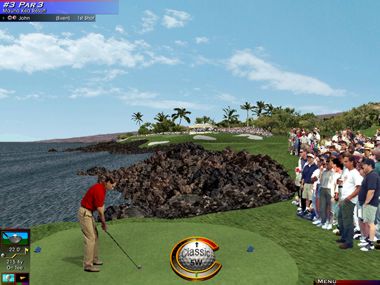
The graphics are very
realistic. From the crowd that stands around you, to the grandstands and
camera towers that loom around the course, you get a clear very distinct
picture of what it is like to actually golf in real-life. Access really
out did it with the quality of the graphics used in this program. The
golfers you can choose from look very authentic and the real life
players look almost exactly like the real thing!
Sound
The sounds are very real in Links LS 2000. As if you were playing in
a real gold tournament, you can hear cheering and booing coming from the
crowd. Plus, the commentators always have choice words for your shot.
The sounds do give you the feel of playing with someone in real-life.
The sounds also include normal everyday sounds, such as planes and
animals, etc. Even though this is only a golf game, Links
LS 2000 maximizes the realism you could possibly get with the sound
environment.
Screenshots


Final Comments
|
How It
Grades
Gameplay: 94%
Accuracy: 96%
Graphics: 93%
Controls: 94%
Sound: 92%
Value: 91%
Overall: 93%
|
Links LS 2000 continues
the Links series of golf games by Access well. It is as close to the
real thing as you could get on today�s gaming technology. By far, it
trumps all other golf games out on the market. I really like to golf so
the games came easy to me. However, with the menus, tutorials and
improved interface even if you weren�t a big golfer you would enjoy
the game. The ability to play this game online (MSN Gaming Zone) makes
playing the game all the more exciting! I really like this game and all
the choices that it gives you � although somewhat overwhelming at
first! The plethora of courses and different golfers is amazing as well.
I�d recommend purchasing Links LS 2000! Well, back to the game �
Four!
| Overall
Score |
93% |
| Version
Reviewed |
2000 |
| Release
Date |
Out
Now (US) |
| In
The Box? |
3
CDs
1 Set of instructions |
| The
Good Points |
Detailed
Graphics
Improved Interface
Good Music & Sound Effects |
| The
Bad Points |
Placing
players in scenery could be improved
More professional golfers |
| Reviewers
PC Setup |
Pentium
II 333
Windows 98 Second Edition
128 Meg SD-Ram
SoundBlaster Live! Value
17" LG Electronics Monitor
|
| PC
Required |
Multimedia
PC with a Pentium 200MHz CPU (or 166 MHz with MMX)
Microsoft Windows 95 or Windows 98 operating system, or
Microsoft Windows NT Workstation 4.0 with Service Pack 3.
32 MB of RAM for Windows 95 or Windows 98; 64 MB of RAM for
Windows NT
Quad Speed CD-ROM drive or faster.
Microsoft Mouse or compatible pointing device
1 MB video capable of 800x600 resolution in 32K colors.
32-bit sound card
Speakers or headphones required for audio.
60 MB of free hard disk space (minimum).
28.8Kbps or faster modem for head-to-head play |
|


